|
|

Arranging the Bookmarks and Creating a Separator |

|

|

|
||
Arranging the Bookmarks and Creating a Separator |
|
|
|

|
|
|
Arranging the Bookmarks and Creating a Separator |
|
|
|
||
Arranging the Bookmarks and Creating a Separator |
|
|
|
|
|
|
||
 Exercise 20: Arrange the Bookmarks and Create a Separator in the Bookmark List.
 | 1. On the My Contents tab, select the Home view. |
| 2. Click the  Manage Bookmarks button. Manage Bookmarks button. |
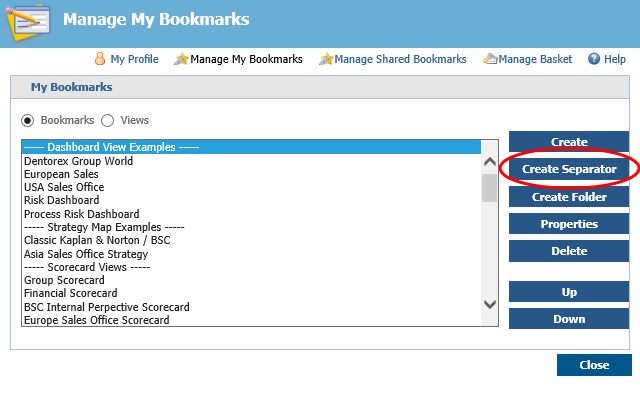
| 3. The Manage My Bookmarks window opens. Click the Create Separator button: |
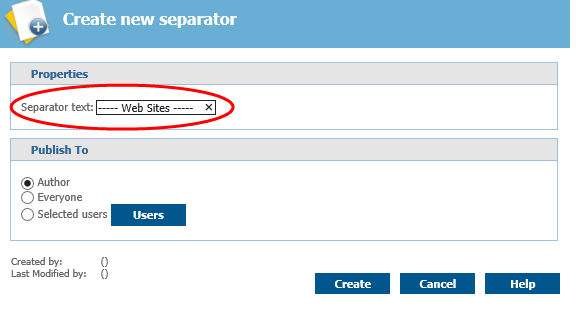
| 4. The Create New Separator window opens. In the Separator text field, type in "----- Web Sites -----" and click Create: |
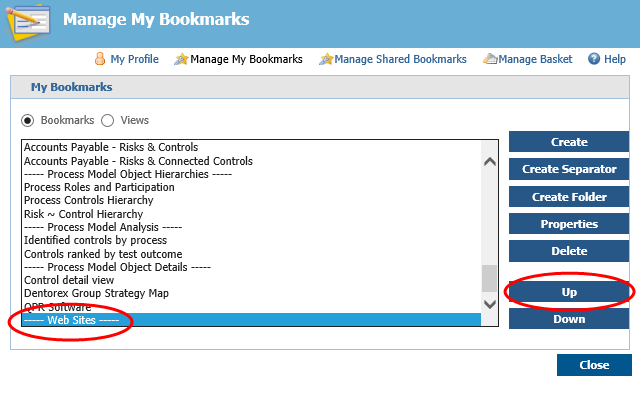
| 5. In the Manage My Bookmarks window, scroll down the list to find the separator you just created. |
| 6. Select the separator and click Up to move it over the QPR Software bookmark: |
| 7. Click Close. |
For more information, see the Bookmarks topic in QPR Portal - User's Guide.